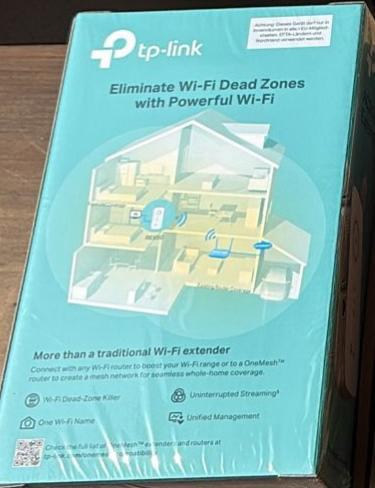


TP-LINK RE220 Wi-Fi Range Extender Wi-Fi 5
1x 10/100M RJ-45 - IEEE802.11ac/n/g/b - 2.4&5 GHz - 20 dBm (EIRP) - WMM - 65.8x55.8x110 mm
Brand: TP-LINK
SKU: RE220
£62.21
Price excl. VAT
£74.65
Price incl. VAT
Available – In Stock

Do you have any question about this product? Click here to contact our pre-sales consultant and make the right purchase.

Buy with confidence: honest stock, fair trade terms
Better prices with correct stock availability, and secure payments with full transparency.
- Aggregated live stock: availability shown is the combined aggregated stock of our warehouses and partner distributors, updated in real time. If it says available, it is available.
- No charge until confirmed: your payment is only reserved at checkout and is charged once your item is secured.
- 24-hour free cancellation: changed your mind? Cancel within 24 hours and the reserved payment is released in full.
- Stock sold out? Full refund: if an item becomes unavailable after you order, we cancel and release or refund 100% of your payment.
- From Our Warehouse to Your Door. every order is checked, packed at our warehouses and dispatched with DHL Express, UPS or FedEx as DDP – No customs or duties to pay. No hidden charges
- Fair cancellation and return terms: for late cancellations or returns of expensive, special-order items without a fault, a fee of up to 5-10% may apply, covering only actual shipping and handling costs to sustain our business. Faulty items and RMA cases are never charged. No late-payment fees, no interest ever. Full terms
 NOTE: The information below is provided for your convenience only; the accuracy of the specifications cannot be guaranteed. However, if necessary, please check with us before purchasing. Data provided by 1 World Sync.
|
|
||||||||||||||||||||||||||||||||||||||||||||||||||||||||||||||||||||||||||||||||||||||||||||||||||||||||||||||||||||||||||
|
||||||||||||||||||||||||||||||||||||||||||||||||||||||||||||||||||||||||||||||||||||||||||||||||||||||||||||||||||||||||||

RE220 - Network transmitter - 750 Mbit/s - 10,100 Mbit/s - Windows 10,Windows 2000,Windows 7,Windows 8,Windows 98SE,Windows NT,Windows Vista,Windows XP - Internal - 20 - 20 dBmW
| Estimate Gross Weight | 0.207 |
|---|
https://www.tp-link.com/en/home-networking/range-extender/re220/
Boost Your WiFi to hard-to-reach Areas
Place the RE220 between your wireless router and wireless devices, expanding WiFi coverage while eliminating WiFi dead zones. Dual-band WiFi can reach speeds up to 750 Mbps and extends up to can not only extend to 3,200 sq. ft. (300m2) with your router. Make the most of you ISP speeds by streaming HD videos, gaming online and other bandwidth-intensive tasks.
Stable Dual Band Connection for More Devices
The RE220ΓÇÖs wireless AC technology creates faster and stronger WiFi connections across your home and extends dual band WiFi up to 750 Mbps. Dual 2.4 GHz and 5 GHz bands provide WiFi connections for up to 32 devices, allowing you to enjoy a stable and drop-free experience on all your devices.
Simple Two-Step Setup
Step 1: Press the WPS button on the router and RE220 to easily connect the extender to the network. Or connect the
extender via Tether app or Web UI if your router doesnΓÇÖt support WPS.
Step 2: Relocate the extender to a better location for optimal WiFi coverage with the help of the smart signal indicator light.
An Access Point and Wireless Adapter
The Ethernet port of RE220 can easily turn your wired Internet connection into a wireless access point. It can also function as a wireless adapter to connect wired devices.
High Speed Mode for Maximized Performance
High Speed Mode uses one dedicated WiFi band as backhaul and another dedicated WiFi band as an access point to maximize the bandwidth on extender's WiFi.
Universal Compatibility
The RE220 is compatible with any of your existing WiFi router or access points, making it easy to expand and strengthen your WiFi network.
Smart Management by Tether App
Set up and manage your WiFi through the TP-Link Tether app on your smartphone (Android, iOS).
Boost Your WiFi to hard-to-reach Areas
Place the RE220 between your wireless router and wireless devices, expanding WiFi coverage while eliminating WiFi dead zones. Dual-band WiFi can reach speeds up to 750 Mbps and extends up to can not only extend to 3,200 sq. ft. (300m2) with your router. Make the most of you ISP speeds by streaming HD videos, gaming online and other bandwidth-intensive tasks.
Stable Dual Band Connection for More Devices
The RE220ΓÇÖs wireless AC technology creates faster and stronger WiFi connections across your home and extends dual band WiFi up to 750 Mbps. Dual 2.4 GHz and 5 GHz bands provide WiFi connections for up to 32 devices, allowing you to enjoy a stable and drop-free experience on all your devices.
Simple Two-Step Setup
Step 1: Press the WPS button on the router and RE220 to easily connect the extender to the network. Or connect the
extender via Tether app or Web UI if your router doesnΓÇÖt support WPS.
Step 2: Relocate the extender to a better location for optimal WiFi coverage with the help of the smart signal indicator light.
An Access Point and Wireless Adapter
The Ethernet port of RE220 can easily turn your wired Internet connection into a wireless access point. It can also function as a wireless adapter to connect wired devices.
High Speed Mode for Maximized Performance
High Speed Mode uses one dedicated WiFi band as backhaul and another dedicated WiFi band as an access point to maximize the bandwidth on extender's WiFi.
Universal Compatibility
The RE220 is compatible with any of your existing WiFi router or access points, making it easy to expand and strengthen your WiFi network.
Smart Management by Tether App
Set up and manage your WiFi through the TP-Link Tether app on your smartphone (Android, iOS).
- Boosts wireless signal to previously unreachable or hard-to-wire areas flawlessly
- Compatible with 802.11 b/g/n and 802.11ac Wi-Fi devices
- Dual band speeds up to 750Mbps
- Miniature size and wall-mounted design make it easy to deploy and move flexibly
- Ethernet port allows the Extender to function as a wireless adapter to connect wired devices
0.0
0 review(s)
In the building · Real shipments · Real operations
Goods in. Goods out. Real Tech, Moving Daily.
A snapshot of the technology we receive, handle, pack and dispatch. These images are captured on site or at customer locations — not from a stock library.